

Mobirise Website Builder
What is the Strategyzer?

High quality multifunctional trading tool that will help to:
    create,
    test,
    optimize,
and automate the trading strategies.

It is marvelous instrument that operates simultaneously on several timeframes. Fits for any market instrument.
The charts will teach you all you need to know once you have framework for reading them.

With your created and proved strategies your trading will become as simple as possible, without getting nervous and without spending a lot of time on market analysis. 

Eliminate Garbage Categories.

Find a trades that is worth taking.

Who is it suitable for?

Who are eager to have great trading results, saving their nerves and time.
It`s peculiarity is that it suits both newcomers and experienced traders. 
You need to be familar with Metatrader 5(MT5).
Anyone who wants to test some strategy, improve or create some strategy and wants to trade on more than just hope can use it.

Waht is inside "Strategyzer"?

It is a huge program for MT5 which is mainly based on price action chart reading.
As you can see on the picture - it was such a large than a strategy tester does not allow you to enter more input parameters(it had to be cut).
There are two groups of settings presented here: signals received from charts and trading settings that you choose yourself.
Almost all parameters can be optimized in strategy tester.
User manual(explain what input parameters mean and how they can be used).

Mobirise Website Builder

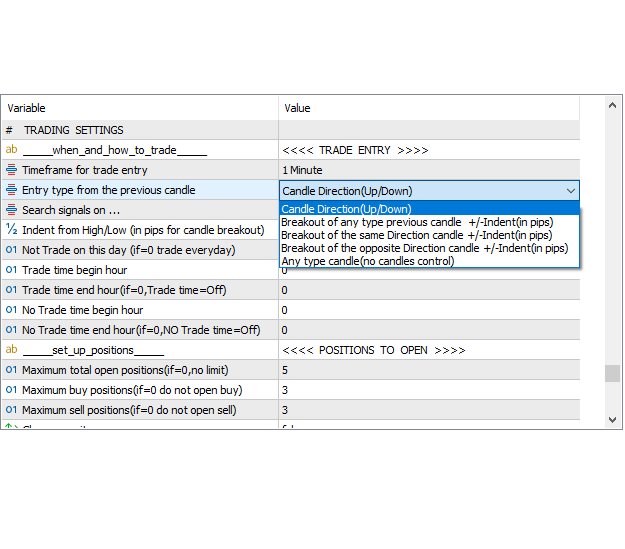
Trading settings   group

This is where you set when to trade, how to enter a trade, and when do not trade.

How often to look for signals, take profits, and move trailing stop-losses.

Time frames can be different for each parameter (several time frames at the same time).
Different for trade entry, for stops and trailing stops, for profit collections and for signals too(different for each signal). 

Mobirise Website Builder

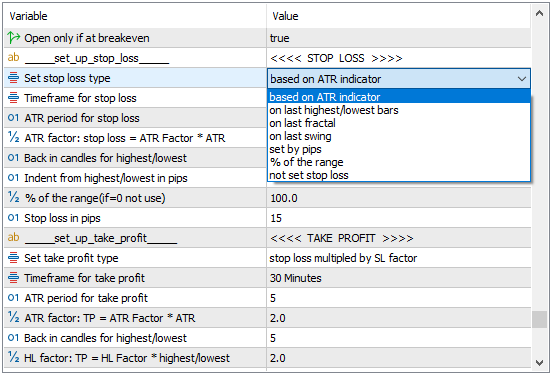
Select your stop loss options.
Select your take profit parameters.

Mobirise Website Builder

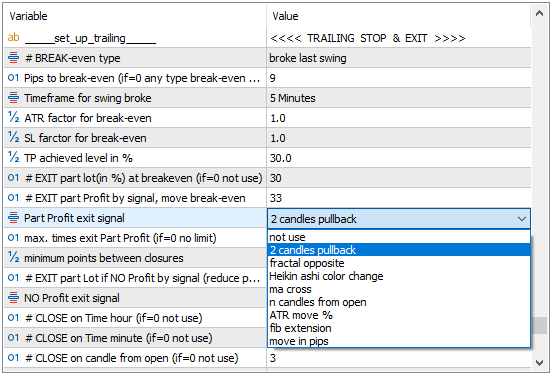
Select the trailing stop loss activation method and set stop loss levels.

Trailing stops and partial exits are activated by signals which you can select from drop-down menu.

You can use 2 trailing methods and activation signals at the same time.
And the third, if there is no profit, to possibly reduce losses.

You can close positions by time, signal and candles from the opening.

 Trade signals  group

  • Signals can be used as mandatory (the "and" condition), as one of many (the "or" condition), or as a combination of both.
  • Each signal can be taken from different timeframe.
  • You can select how long the signal is valid in term of candles from the first appearance of signal.
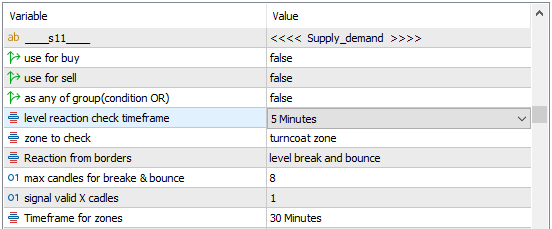
  • If the signal uses a level that needs to be checked with reaction of candles, then the level can be taken from one timeframe, and the reaction can be checked on another timeframe(look at picture below).
Mobirise Website Builder

# signal group of waves structure.

14 chart pattern signals which can be combined and create more.

# signal group of support/resistance.

9 types of S/R and 5 types of reaction from levels. 
Moving averages and bollinger bands are also included, which can be used in 9 ways to collect the signal.

# signal group of candlestick patterns.

17 signals which can be used as pattern in pattern too.
Candlestick patterns against your trade direction.

# signal group of trendlines.

12 different signals from trendlines.

# signal group of  divergences.

 8 regular divergences and 8 hidden divergences,
 6 hidden divergences against trade direction.

# signal group of  oscillators.

 12 standard oscillators,
 1 your indicator oscillator.

You can check whether the price is at some required level, or is the price moving to some level.
Analyze how this level was reached, and determine whether any actions are required to make a decision.
You can find out which conditions to trade, or how to trade some condition.
You can also specify which timeframes should be considered significant for signals, and determine which combinations of timeframes yield the best results. 
Decide when and how to execute trades, and when to refrain from trading.

Like everyone else, you read data from charts and interpret it in your own way.

Are you ready to create?

To be successful, you need a clear set of trading strategies.

Trading - Business of probabilities,
Strategyzer - tool for increase probabilities.

Is it for you?

Here is a way to save on your license duration:
activate your license after you have reviewed the user manual.
Download the user manual from the customer section.
Study the manual carefully.
Activate your license when you are ready to start working with Strategyzer.

Strategyzer - a laboratory of sorts for your research.

Is it for you now?

Frequently Asked Questions

Strategyzer works by analyzing market data and helping users build effective trading strategies based on chart patterns and indicators.

Absolutely! Strategyzer is designed for traders of all levels, from novices to experts, making it easy for anyone to create and test strategies.

Yes, Strategyzer is built with robust security features to ensure the safety of your trades and data, giving you peace of mind while trading.

Since this tool is also for learning - Strategyzer offers 1/24 customer support to help users resolve any questions or problems that may arise while using the software.

Currently, Strategyzer is optimized for use on the Metatrader 5 platform, providing seamless integration for a superior trading experience.

Yes, you can obtain one in exchange for a profitable strategy that is not already in the repository and meets the required criteria.
Alternatively, you can get one by making 12 monthly payments.

Get Started Today

© Copyright 2026 Strategyzer - All Rights Reserved                                                                                                                                                                                                                                        Privacy Policy    Terms of Service    Refund Policy

‌

Free AI Website Builder